What is RIKA MWII and the problem it solves
RIKA MWII is a settings and controls utility for MWII players who want more control over how their loadout behaves in game. It bundles activation, control, and targeting options into a single menu so you can set up your preferred trigger behavior and aim selection once, then keep them consistent across sessions.
The exact problem it solves is configuration friction. Instead of finding and adjusting each option separately, RIKA MWII puts key settings in one place: your activation key, trigger mode, target distance, and on-screen markers. For players who tune these settings often, that saves real time and keeps adjustments predictable.
This guide walks through the full setup from a fresh license, so you can go from purchase to a working configuration in a few minutes.
Who RIKA MWII is for, and who it is not for
RIKA MWII is built for MWII players who already understand what trigger and targeting settings do and want a cleaner way to manage them. If you are the kind of player who tweaks your configuration between matches and wants the controls surfaced in one menu, this is the product for you.
It is not for newcomers who are still learning what these settings mean. If you do not yet know which trigger mode or target type suits your play, you will get more value from basic in-game training first, because RIKA MWII manages settings rather than teaching you how to use them. It is also not a substitute for buying the game or any license you need to play it legitimately.
What is included with your purchase
Your purchase covers the RIKA MWII license tied to the settings and controls feature set described on the product page: an activation and control menu, a custom activation key, trigger mode settings, targeting options, and visual marker configuration. The product listing is the authoritative source for the exact details, so check it for the full feature list before you buy.
Delivery works through the store's standard digital fulfillment. After checkout, your license details arrive through your account, and you follow the activation steps below to get set up. Keep the delivery email handy during first setup, because your activation key lives there.
How to set up RIKA MWII, step by step
Before you start, confirm three prerequisites. You need the game installed and current, the RIKA MWII files downloaded from your purchase, and the activation key from your delivery email ready to paste. Set aside a few quiet minutes; nothing here is hard, but you want to avoid distractions during activation.
- Download and install the files. Pull the files from your purchase and run the installer. Let it finish completely before launching anything.
- Open RIKA MWII and go to the Activation menu. The menu is where you enter your key. Make sure you are copying the full key with no spaces and no stray line breaks.
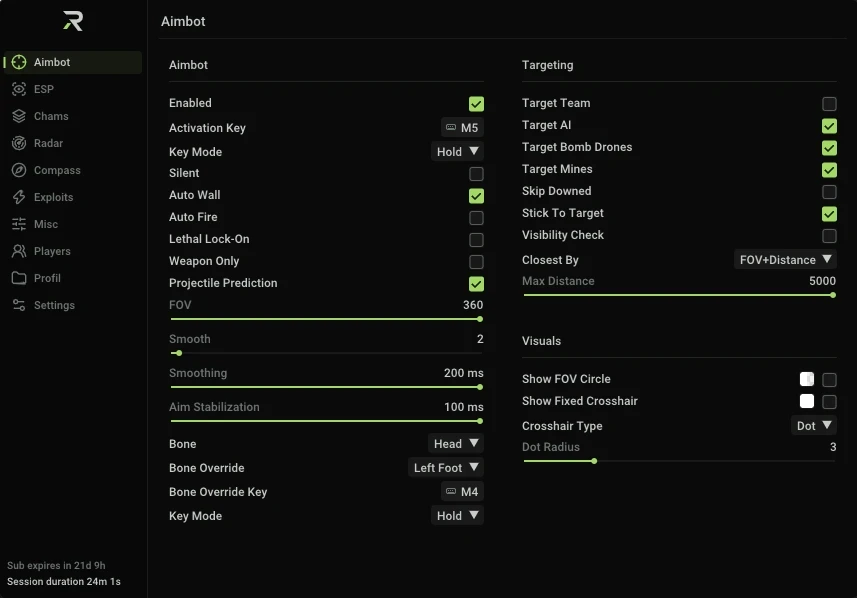
- Choose the activation key and control mode. The product page shows an Activation and control screen where you select the activation key and your control mode first. Get these in before touching the targeting options.
- Set your custom activation key. This is the key you press to trigger your configured behavior in game. Pick something that does not conflict with keys you use frequently.
- Configure trigger mode. Under the trigger settings, choose the mode that matches how you want the action to fire. Test it with a low-pressure setup before you rely on it in a match.
- Set up targeting. Choose target selection and distance, then adjust maximum distance and which target types you check. Keep the distance values grounded in what you actually encounter on the maps you play.
- Configure your visual markers. Pick the markers you want displayed, your field of view circle, static crosshair and crosshair type, plus marker colours and sizes. These are cosmetic, so set them for clarity over style.
- Save and verify. Save the configuration, load into the game, and confirm the trigger and targeting behave as you set them.
Common mistakes that cause the most setup problems
- Pasting extra whitespace into the activation key. A space or newline either side of the key is the most common reason activation fails. Paste into a plain text field, then check the ends before submitting.
- Setting the activation key to one you already use. If your custom key collides with a frequent in-game action, you will trigger behavior you did not intend. Choose a dedicated key.
- Skipping trigger mode testing. Jumping straight into a match with a new trigger mode is risky. Test in a quiet session first so you know exactly what it does.
- Entering a target distance that is too long. Overly large maximum distances can clutter your view with out-of-range targets. Start modest and widen it only if you need to.
- Turning on every marker at once. A field of view circle plus crosshair plus all markers is visually noisy. Enable what you read easily, not everything available.
Troubleshooting the most likely failure points
Activation fails or the key is rejected
This is the most common support ticket. First, recheck the key for extra spaces, missing characters, and whether you copied the whole string. If the key looks clean and still fails, confirm you have the correct license for the edition of RIKA you bought, because the keys are edition-specific.
Trigger does not respond in game
Confirm the control mode you selected matches how your game is set up, and that your custom activation key is not being intercepted by another tool running in the background. Close overlay and macro utilities you do not need, then retest.
Targeting picks the wrong targets
Review your maximum distance and the target types with visibility checks enabled. If targets outside your intended range are being selected, tighten the distance. If the right targets are being skipped, widen the target types you check.
Markers do not appear or look wrong
Check that the markers for the fields you care about are toggled on, and that the marker colours are distinct from the map background. A colour that blends into the terrain is easy to miss, so pick contrast over preference.
If a step still fails after these checks, the product page is the best next stop for the precise details of your license and its handling, since the listing defines exactly what your purchase covers.
Frequently asked questions before buying
Does the license work on more than one system?
Check the product page for the exact device and reactivation coverage for your license. If your hardware changes, review the reactivation guidance there before reinstalling.
Will I need to activate again after an update?
Keep your activation key saved somewhere safe. Whether a given update requires reactivation depends on how the license is handled, so the product page is the place to confirm before you assume.
Can I move the activation key to another machine?
Transferability depends on your specific license terms. Confirm the region and transfer rules on the product page before you plan a move between systems.
Do I get free updates with this license?
Update entitlement is defined per license. Check the product listing to see whether updates are included and for how long, so you know what to expect.
Is this legal to use with my copy of the game?
RIKA MWII is a settings and controls utility for MWII. It does not replace any license you need to play the game, so make sure you own a legitimate copy of MWII and comply with its terms of service while using it.
What are the system requirements?
Your hardware needs to handle MWII itself, which is the heaviest part of the setup. Confirm the exact requirements for RIKA MWII on the product page, and run the game's own recommended specs as your baseline.
Start with a clean activation
Most setup problems trace back to a paste error, a conflicting key, or skipping the test step. Avoid those three and RIKA MWII configures cleanly the first time, leaving you to dial in the trigger mode and target selection that fit your play.
Browse the RIKA product page to review the full feature list and license details, then grab your key and follow the steps above to get set up.